
- When starting a delivery, wire in or wire out order, search for the customer and retrieve them.
- Click on the tab labeled HISTORY on the top next to the SALES and AGING tabs.
- Once the HISTORY tab is selected, the window will display all of the customer's previous orders.
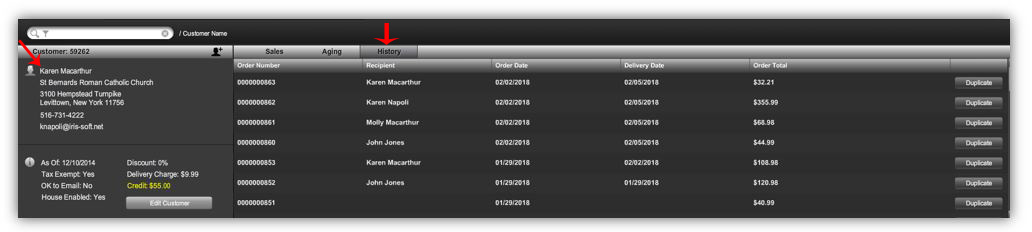
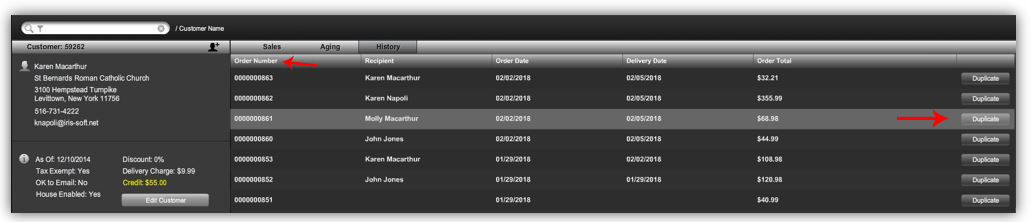
- To find a particular order, you can SORT PREVIOUS Orders by clicking on the column headers: Order Number, Recipient, Order Date, Delivery Date, and Order Total.
- If you click on the header once it will sort the orders in ascending order. If you click on the header twice it will sort the orders in descending order.
- Locate and select the desired order and click the DUPLICATE button. This will duplicate the entire order.
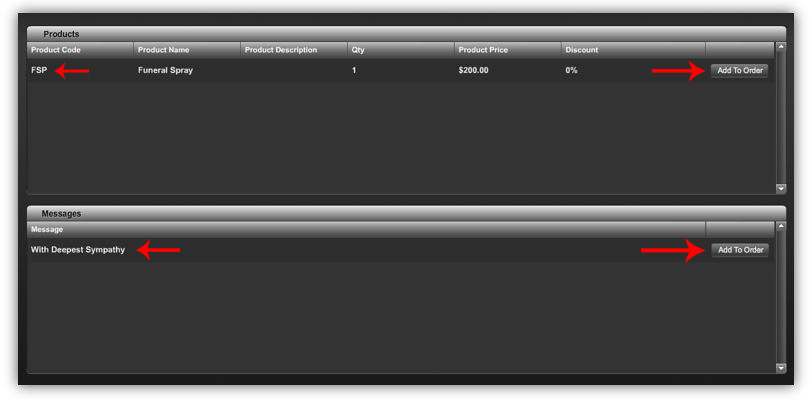
- If you click on the ORDER NUMBER directly, a window will open that will give you the option to duplicate the product(s) from that order and/or the card message from that order.
Video Tutorial:
Comments
0 comments
Please sign in to leave a comment.